What is Reap?

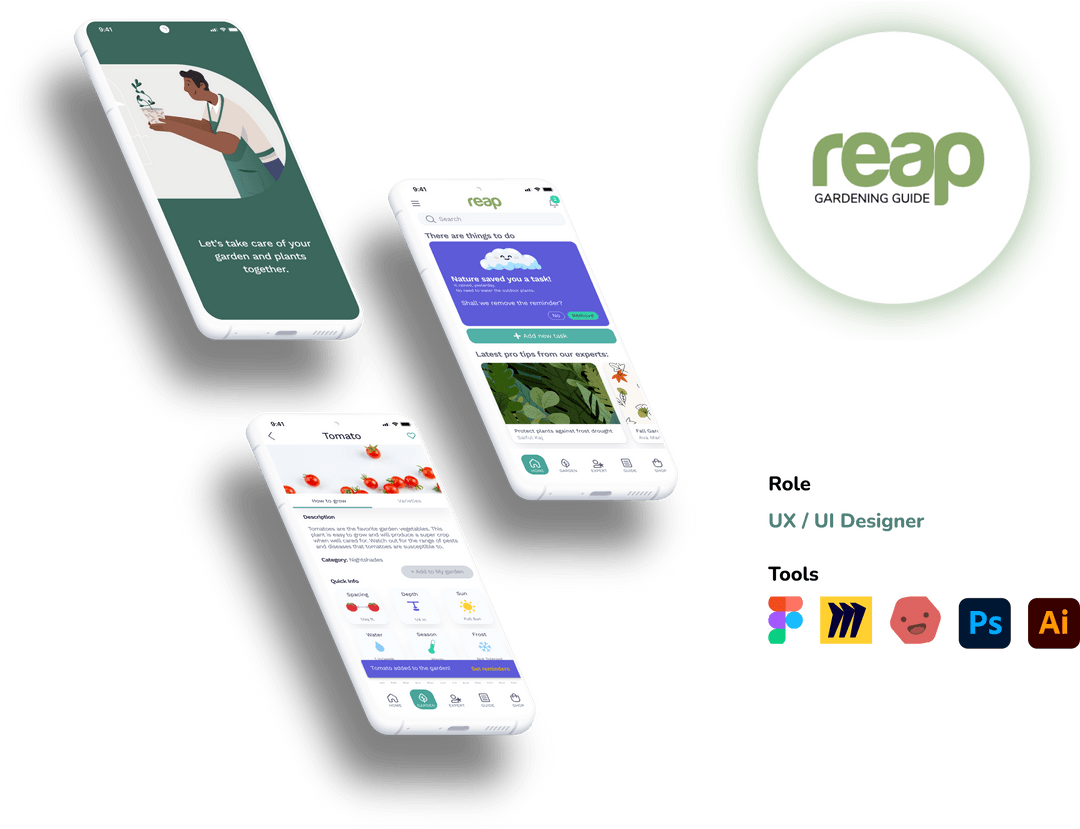
A responsive mobile app that caters to gardening enthusiasts looking to design and take care of the garden. It is for people of all ages who want to learn or improve their gardening skills.

PLANT INFORMATION

Learn about your plants and discover the best bee-friendly ones to grow — with tips on the perfect planting time.

CARE REMINDERS

Never over- or under-water again — set care reminders and get rain updates so you can relax while your plants thrive.

CONTACT EXPERT

Stuck with a gardening problem? Book a call with an expert for local tips and tricks.

DESIGN WITH AR

Want to design your garden in real time? Use Augmented Reality (AR) to find the perfect spot for every plant.

The way ahead

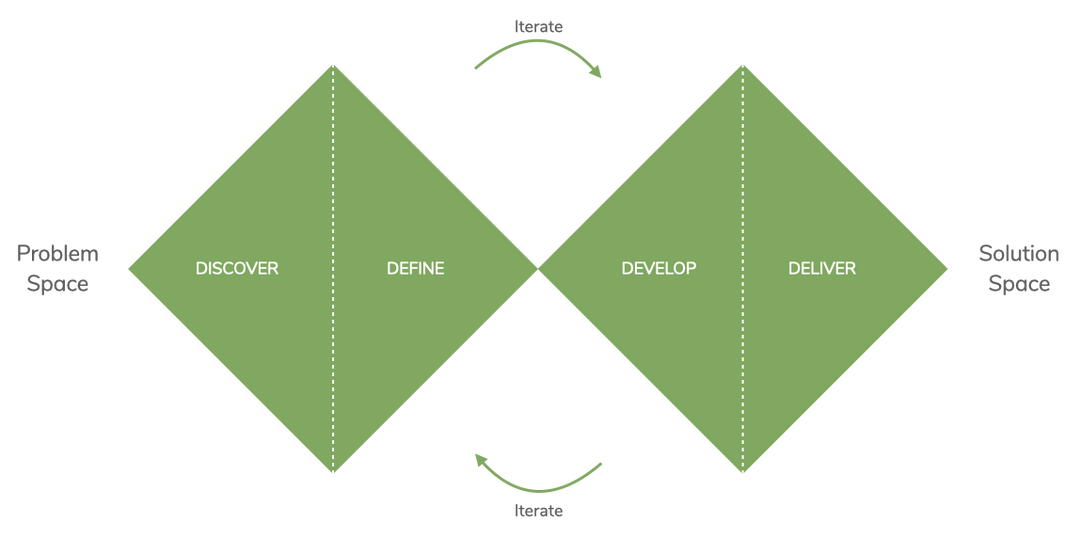
For the case study, the Double Diamond design thinking process was decided to develop Reap: a gardening guide application. The challenge was to design a simple and intelligent solution to a problem for which there's no established solution that users have already become accustomed.

Discover

Observations

  1. Inexperienced gardeners are often unsure how to take care of their garden and maintain it.
  2. One always forgets to water the plants or overwaters them.
  3. Often, information on the internet is not compatible with the local region.

User Research

User surveys and user interviews were conducted to understand the underlying user pain points and their needs and goals. User surveys helped identify the factors affecting users' experience while gardening for new and seasoned gardeners. User interviews enabled dig deeper into these broader perspectives and segregate them into macro themes.


Key Insights

After 100's of sticky notes sorting, followed by affinity mapping and analyzing a pile of data, here's a list of insights:

User Research Full Report

QUANTITATIVE: SURVEYS

8 Participants

12 Questions

Age: 20 to 60

Local plant information

is crucial

75%

75% of the participants use websites to gain information about gardening. All the participants rely on YouTube for information when trying something new but fail to find locally relevant content.

access to expert/guide

can be improved

12.5%

Only 12.5% of the participants have referred to a local gardening group for guidance. The others do not know if there is a platform to find one.

watering reminders

is badly needed

100%

All the participants shared that they want an app to remind them when to water which plant. Keeping track of which plant requires how much water is challenging.

QUALITATIVE: INTERVIEWS

3 Participants

13 Questions

Age: 20 to 60

Common Pain Points and opinions on Experts:

  1. The participants said they refer either their family elders or friends for gardening help because they have been doing it for a long time and know the local requirements.
  2. The participants shared that they want an app to remind them when to water which plant.
  3. The participants said they would like to know the indigenous and organic solutions to insects, slugs, and other gardening problems.
  4. When to plant what, transfer from pot to soil, and harvesting time” was a common problem that the participants sought guidance for.
  5. A fascinating insight was that the participants feel there is content on how to solve a problem or fix a dying plant, but not much to prevent and correctly maintain the issues.

Define

Problem StatemenT

Reap users need a way to guide them through the process of growing vegetables because they may be inexperienced in gardening. We will know this to be true when we see that the app has helped them produce their first ripe tomato.

user personas

These personas are the face of extensive user research, and they represent the target audience for Reap. Two personas and their journeys were created to develop solutions by stepping into the persona's shoes.

user journeys

Develop

overview

Now it was time to define the information architecture before creating any wireframes. 'Open card sorting' was decided to understand the users' mental and conceptual models. The card sort led to some exciting insights and was utilized to build the refined information architecture.

Card SortinG

Equipped with a better understanding of user personas, their needs, and the paths to accomplish desired tasks, the sitemap was created: a hierarchical view of the site’s information, including the structure of the pages and the content contained within. After several discussions and revisions, it started with a basic structure and soon developed into a much clearer one.

Card Sorting & Sitemap Full Report

design evolution

As the design evolved from a lo-fi to a hi-fi prototype, one could see the ideas forming better with each step. The evolution of the design from Lo-fi to Hi-fi for two key features is shown below:

HOME SCREEN

Low Fidelity

Mid Fidelity

High Fidelity

EXPERTS LIST SCREEN

Low Fidelity

Mid Fidelity

High Fidelity

usability testing

Methodology: Moderated Remote | Moderated in-person TestingThe usability test was done with six participants. This was very helpful in identifying the weak points to understand what worked well and what could be improved. A glimpse of the improvements is illustrated below.


Usability Testing Full Report

Preference test

Preference test

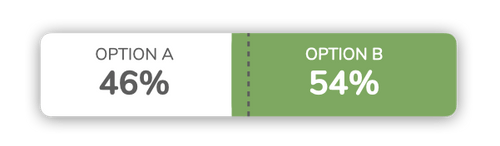
A preference test was conducted with 24 participants to validate the design decisions. Two images were tested for one of the onboarding screens. The purpose of testing the two images was to determine if users prefer a photograph of a plant or an illustration. The test helped define the rest of the onboarding screens as well as the overall theme of the application.

The most common words used to describe the preferred Option B were ‘warm,’ ‘friendly,’ and ‘inviting.’One of the participants stated that their reason for choosing the screen as, “I went for this one, based on the image showing the illustration of a person, and I think this goes nicely with your tagline, in that a goal is being worked on ‘together.’”

DeLIVER

Peer review

Design can never be done in isolation; feedback from colleagues helps only to improve the design further. After a successful peer review, the following revisions were incorporated:

Peer review based updates - Full report


Feedback about functional improvement and design consistency:

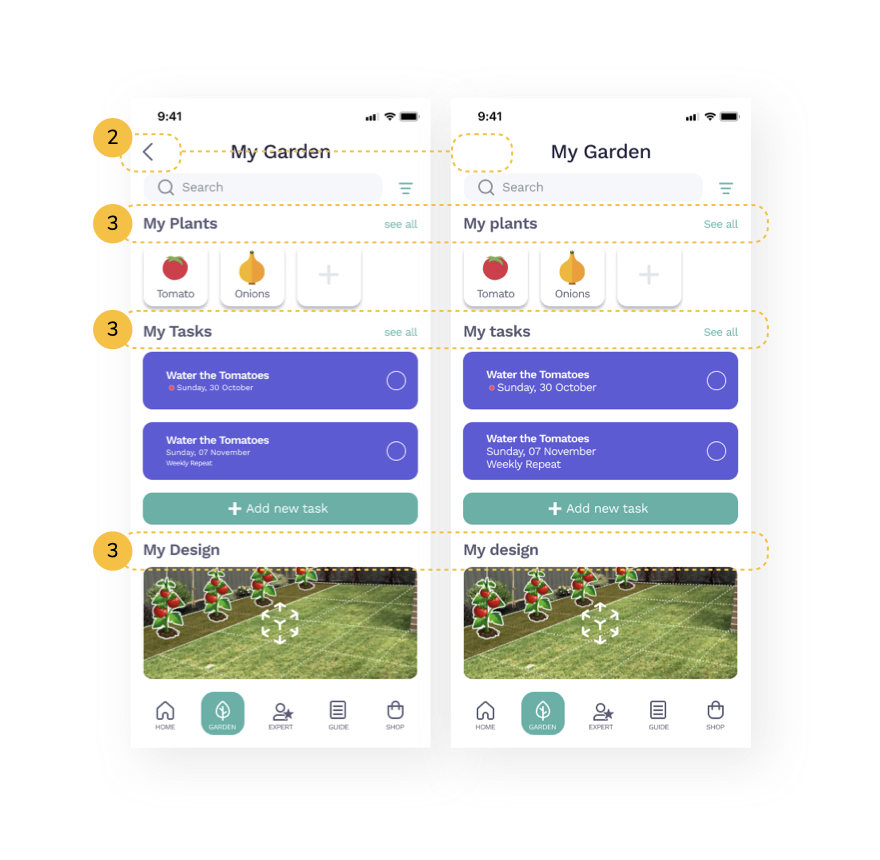
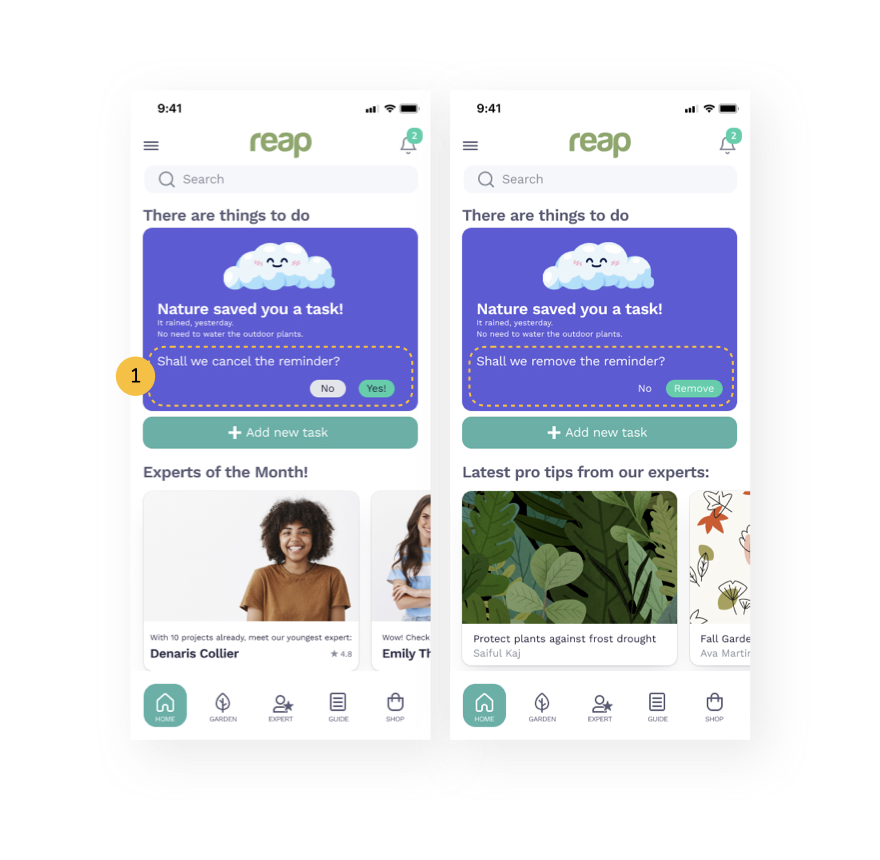
  1. The green button says ‘Yes,’ but the purpose is to cancel the reminder. Green has a positive connotation and might be better used to reinforce positive interactions with the app. Therefore, I changed the button text from ‘cancel’ to ‘remove.’
  2. Removing the back button from all the landing pages.
  3. Keeping only the first letter of the text as capital.


design handoff

After the extensive phase of designing & testing with constant iteration, it is time to prepare the project for a design handoff. A detailed Design language system was prepared to keep everyone in the same loop.

Design language system - Full report

Final Design

Responsive Web Application

Design your gardenwith Augmented Reality

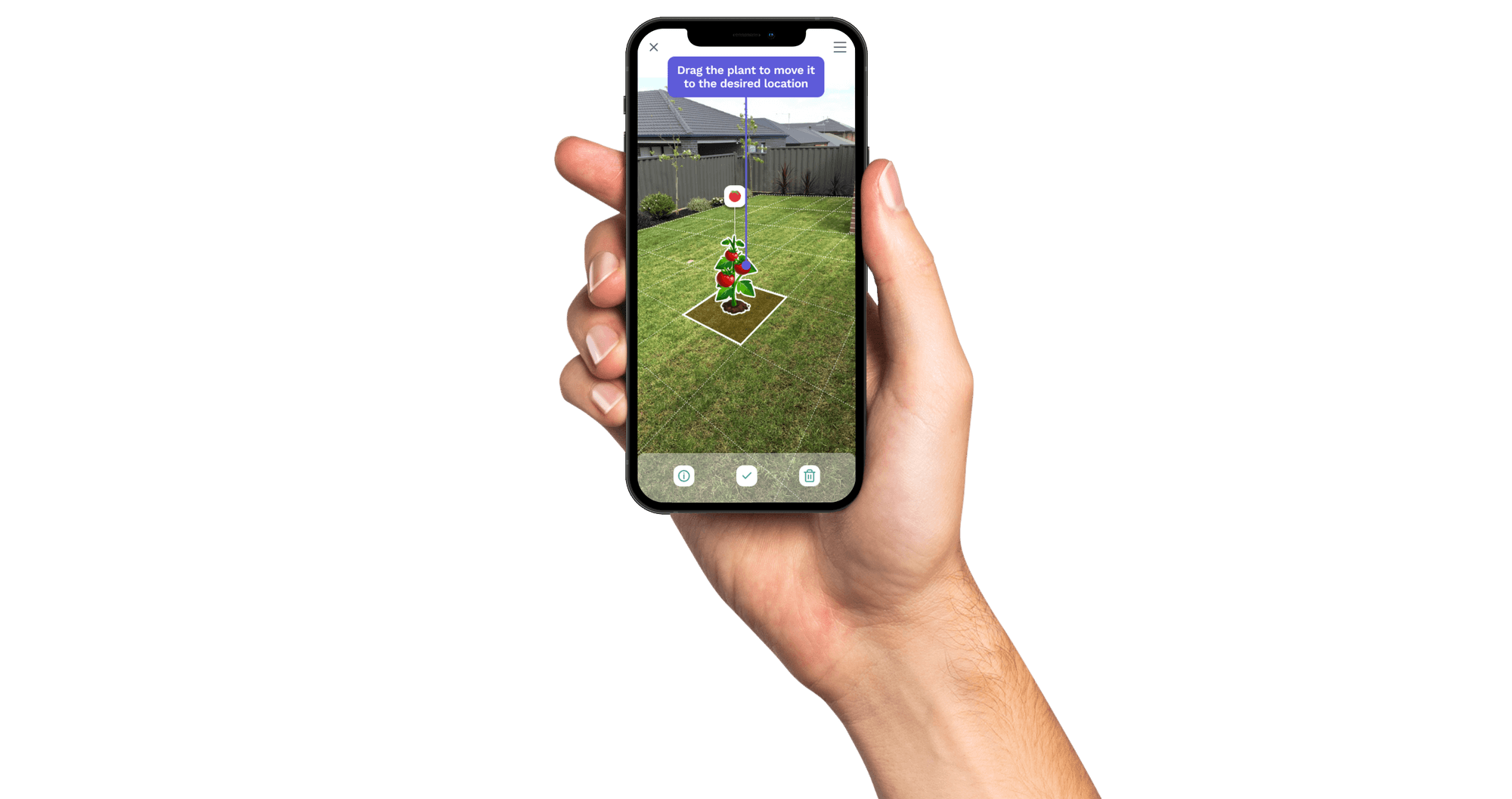
Design with the real-time view, get more information about your plants and plan your next plant with the Good and Bad Combination. Check and set a reminder for each plant.

Interactive Prototype

Learnings of the UX journey

Hi! I'm Bhrigu, the person behind this app design.

One of the primary learning of this journey began with the choosing of the app topic. The inspiration was my brother, who had just moved to a new city and home with a beautiful backyard. He wanted to grow a vegetable garden but had little guidance to begin. Since he knows I am interested in plants, he asked for my opinion, but coming from a different country too, I didn’t know the regional plants or what they needed to thrive in this environment. I wanted to create something that is accessible to everyone, especially to those living in new places who wish to express their love for plants and nature.After the user interviews, I included the feature of meeting local gardening experts. Local indigenous gardening techniques result from years of experience and are reliable. I understood that someone from Latvia has a very different gardening experience than one from Australia. Therefore, a gardening expert can be a great help to guide you with the local techniques.Another aspect that I included was designing the garden with Augmented Reality. This was a challenging bit. There are no guidelines, as of now, for designing UX for AR-based applications. I went down a rabbit hole in my aspiration to design an AR Garden designing app. A few days into researching, I found myself downloading Adobe Aero, a beta version of Augmented Reality design software. I was ready to go to all lengths to perfect the UX of Reap. Soon I realized the core of UX designing, it is a process of improvements and never really perfect.On a personal note, I learned a few life lessons while working on this project. One of them is to be open to being wrong. I learned to let go of my ideas and my assumptions. Getting too attached to my ideas stifles innovation because it limited me from looking at other options and beyond. It changed my perspective from looking at ideas to defending my pride. Another significant learning was not to make assumptions. I was amazed at my assumptions and how many of them altered by simply questioning these assumptions to the potential users.

Contact

BhriguKalia© 2026 All Rights Reserved

All Rights Reserved

What is Reap?

A responsive mobile app that caters to gardening enthusiasts looking to design and take care of the garden. It is for people of all ages who want to learn or improve their gardening skills.

PLANT INFORMATION

Learn about your plants and discover the best bee-friendly ones to grow — with tips on the perfect planting time.

CARE REMINDERS

Never over- or under-water again — set care reminders and get rain updates so you can relax while your plants thrive.

CONTACT EXPERT

Stuck with a gardening problem? Book a call with an expert for local tips and tricks.

DESIGN WITH AR

Want to design your garden in real time? Use Augmented Reality (AR) to find the perfect spot for every plant.

The way ahead

For the case study, the Double Diamond design thinking process was decided to develop Reap: a gardening guide application. The challenge was to design a simple and intelligent solution to a problem for which there's no established solution that users have already become accustomed.

Discover

Observations

  1. Inexperienced gardeners are often unsure how to take care of their garden and maintain it.
  2. One always forgets to water the plants or overwaters them.
  3. Often, information on the internet is not compatible with the local region.

User Research

User surveys and user interviews were conducted to understand the underlying user pain points and their needs and goals. User surveys helped identify the factors affecting users' experience while gardening for new and seasoned gardeners. User interviews enabled dig deeper into these broader perspectives and segregate them into macro themes.


Key Insights

After 100's of sticky notes sorting, followed by affinity mapping and analyzing a pile of data, here's a list of insights:

User Research Full Report

QUANTITATIVE: SURVEYS

8 Participants

12 Questions

Age: 20 to 60

Local plant information

is crucial

75%

75% of the participants use websites to gain information about gardening. All the participants rely on YouTube for information when trying something new but fail to find locally relevant content.

access to expert/guide can be improved

12.5%

Only 12.5% of the participants have referred to a local gardening group for guidance. The others do not know if there is a platform to find one.

watering reminders

is badly needed

100%

All the participants shared that they want an app to remind them when to water which plant. Keeping track of which plant requires how much water is challenging.

QUALITATIVE: INTERVIEWS

3 Participants

13 Questions

Age: 20 to 60

Common Pain Points and opinions on Experts:

  1. The participants said they refer either their family elders or friends for gardening help because they have been doing it for a long time and know the local requirements.
  2. The participants shared that they want an app to remind them when to water which plant.
  3. The participants said they would like to know the indigenous and organic solutions to insects, slugs, and other gardening problems.
  4. When to plant what, transfer from pot to soil, and harvesting time” was a common problem that the participants sought guidance for.
  5. A fascinating insight was that the participants feel there is content on how to solve a problem or fix a dying plant, but not much to prevent and correctly maintain the issues.

Define

Problem StatemenT

Reap users need a way to guide them through the process of growing vegetables because they may be inexperienced in gardening. We will know this to be true when we see that the app has helped them produce their first ripe tomato.

user personas

These personas are the face of extensive user research, and they represent the target audience for Reap. Two personas and their journeys were created to develop solutions by stepping into the persona's shoes.

user journeys

Develop

overview

Now it was time to define the information architecture before creating any wireframes. 'Open card sorting' was decided to understand the users' mental and conceptual models. The card sort led to some exciting insights and was utilized to build the refined information architecture.

Card SortinG

Equipped with a better understanding of user personas, their needs, and the paths to accomplish desired tasks, the sitemap was created: a hierarchical view of the site’s information, including the structure of the pages and the content contained within. After several discussions and revisions, it started with a basic structure and soon developed into a much clearer one.

Card Sorting & Sitemap Full Report

design evolution

As the design evolved from a lo-fi to a hi-fi prototype, one could see the ideas forming better with each step. The evolution of the design from Lo-fi to Hi-fi for two key features is shown below:

HOME SCREEN

Low Fidelity

Mid Fidelity

High Fidelity

EXPERTS LIST SCREEN

Low Fidelity

Mid Fidelity

High Fidelity

usability testing

Methodology: Moderated Remote | Moderated in-person TestingThe usability test was done with six participants. This was very helpful in identifying the weak points to understand what worked well and what could be improved. A glimpse of the improvements is illustrated below.


Usability Testing Full Report

Preference test

Preference test

A preference test was conducted with 24 participants to validate the design decisions. Two images were tested for one of the onboarding screens. The purpose of testing the two images was to determine if users prefer a photograph of a plant or an illustration. The test helped define the rest of the onboarding screens as well as the overall theme of the application.

The most common words used to describe the preferred Option B were ‘warm,’ ‘friendly,’ and ‘inviting.’One of the participants stated that their reason for choosing the screen as, “I went for this one, based on the image showing the illustration of a person, and I think this goes nicely with your tagline, in that a goal is being worked on ‘together.’”

DeLIVER

Peer review

Design can never be done in isolation; feedback from colleagues helps only to improve the design further. After a successful peer review, the following revisions were incorporated:

Peer review based updates - Full report


Feedback about functional improvement and design consistency:

  1. The green button says ‘Yes,’ but the purpose is to cancel the reminder. Green has a positive connotation and might be better used to reinforce positive interactions with the app. Therefore, I changed the button text from ‘cancel’ to ‘remove.’
  2. Removing the back button from all the landing pages.
  3. Keeping only the first letter of the text as capital.


design handoff

After the extensive phase of designing & testing with constant iteration, it is time to prepare the project for a design handoff. A detailed Design language system was prepared to keep everyone in the same loop.

Design language system - Full report

Final Design

Responsive Web Application

Design your gardenwith Augmented Reality

Design with the real-time view, get more information about your plants and plan your next plant with the Good and Bad Combination. Check and set a reminder for each plant.

Interactive Prototype

Learnings of the UX journey

Hi! I'm Bhrigu, the person behind this app design.

One of the primary learning of this journey began with the choosing of the app topic. The inspiration was my brother, who had just moved to a new city and home with a beautiful backyard. He wanted to grow a vegetable garden but had little guidance to begin. Since he knows I am interested in plants, he asked for my opinion, but coming from a different country too, I didn’t know the regional plants or what they needed to thrive in this environment. I wanted to create something that is accessible to everyone, especially to those living in new places who wish to express their love for plants and nature.After the user interviews, I included the feature of meeting local gardening experts. Local indigenous gardening techniques result from years of experience and are reliable. I understood that someone from Latvia has a very different gardening experience than one from Australia. Therefore, a gardening expert can be a great help to guide you with the local techniques.Another aspect that I included was designing the garden with Augmented Reality. This was a challenging bit. There are no guidelines, as of now, for designing UX for AR-based applications. I went down a rabbit hole in my aspiration to design an AR Garden designing app. A few days into researching, I found myself downloading Adobe Aero, a beta version of Augmented Reality design software. I was ready to go to all lengths to perfect the UX of Reap. Soon I realized the core of UX designing, it is a process of improvements and never really perfect.On a personal note, I learned a few life lessons while working on this project. One of them is to be open to being wrong. I learned to let go of my ideas and my assumptions. Getting too attached to my ideas stifles innovation because it limited me from looking at other options and beyond. It changed my perspective from looking at ideas to defending my pride. Another significant learning was not to make assumptions. I was amazed at my assumptions and how many of them altered by simply questioning these assumptions to the potential users.

Contact

BhriguKalia© 2026 All Rights Reserved

All Rights Reserved

What is Reap?

A responsive mobile app that caters to gardening enthusiasts looking to design and take care of the garden. It is for people of all ages who want to learn or improve their gardening skills.

PLANT INFORMATION

Learn about your plants and discover the best bee-friendly ones to grow — with tips on the perfect planting time.

CARE REMINDERS

Never over- or under-water again — set care reminders and get rain updates so you can relax while your plants thrive.

CONTACT EXPERT

Stuck with a gardening problem? Book a call with an expert for local tips and tricks.

DESIGN WITH AR

Want to design your garden in real time? Use Augmented Reality (AR) to find the perfect spot for every plant.

The way ahead

For the case study, the Double Diamond design thinking process was decided to develop Reap: a gardening guide application. The challenge was to design a simple and intelligent solution to a problem for which there's no established solution that users have already become accustomed.

Discover

Observations

  1. Inexperienced gardeners are often unsure how to take care of their garden and maintain it.
  2. One always forgets to water the plants or overwaters them.
  3. Often, information on the internet is not compatible with the local region.

User Research

User surveys and user interviews were conducted to understand the underlying user pain points and their needs and goals. User surveys helped identify the factors affecting users' experience while gardening for new and seasoned gardeners. User interviews enabled dig deeper into these broader perspectives and segregate them into macro themes.


Key Insights

After 100's of sticky notes sorting, followed by affinity mapping and analyzing a pile of data, here's a list of insights:

User Research Full Report

QUANTITATIVE: SURVEYS

8 Participants

12 Questions

Age: 20 to 60

Local plant information

is crucial
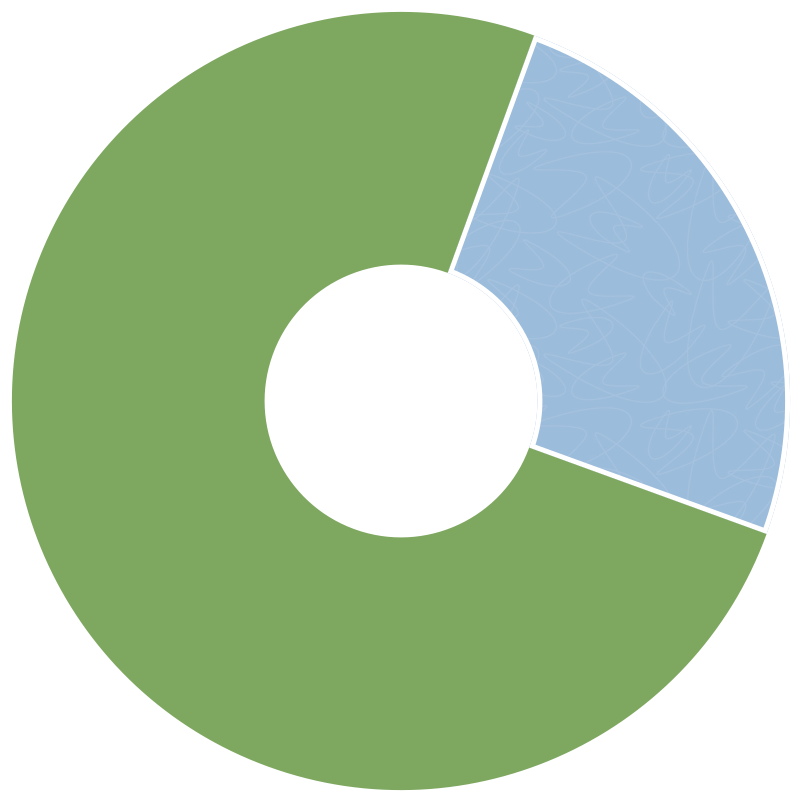
75%

75% of the participants use websites to gain information about gardening. All the participants rely on YouTube for information when trying something new but fail to find locally relevant content.

access to expert/guide can be improved
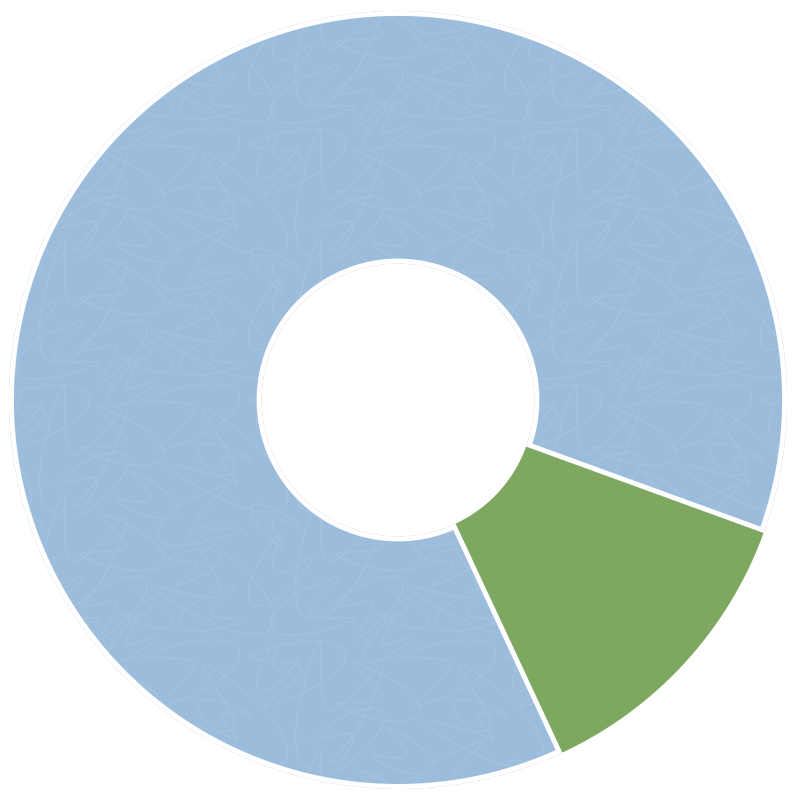
12.5%

Only 12.5% of the participants have referred to a local gardening group for guidance. The others do not know if there is a platform to find one.

watering reminders

is badly needed

100%

All the participants shared that they want an app to remind them when to water which plant. Keeping track of which plant requires how much water is challenging.

QUALITATIVE: INTERVIEWS

3 Participants

13 Questions

Age: 20 to 60

Common Pain Points and opinions on Experts:

  1. The participants said they refer either their family elders or friends for gardening help because they have been doing it for a long time and know the local requirements.
  2. The participants shared that they want an app to remind them when to water which plant.
  3. The participants said they would like to know the indigenous and organic solutions to insects, slugs, and other gardening problems.
  4. When to plant what, transfer from pot to soil, and harvesting time” was a common problem that the participants sought guidance for.
  5. A fascinating insight was that the participants feel there is content on how to solve a problem or fix a dying plant, but not much to prevent and correctly maintain the issues.

Define

Problem StatemenT

Reap users need a way to guide them through the process of growing vegetables because they may be inexperienced in gardening. We will know this to be true when we see that the app has helped them produce their first ripe tomato.

user personas

These personas are the face of extensive user research, and they represent the target audience for Reap. Two personas and their journeys were created to develop solutions by stepping into the persona's shoes.

user journeys

Develop

overview

Now it was time to define the information architecture before creating any wireframes. 'Open card sorting' was decided to understand the users' mental and conceptual models. The card sort led to some exciting insights and was utilized to build the refined information architecture.

Card SortinG

Equipped with a better understanding of user personas, their needs, and the paths to accomplish desired tasks, the sitemap was created: a hierarchical view of the site’s information, including the structure of the pages and the content contained within. After several discussions and revisions, it started with a basic structure and soon developed into a much clearer one.

Card Sorting & Sitemap Full Report

design evolution

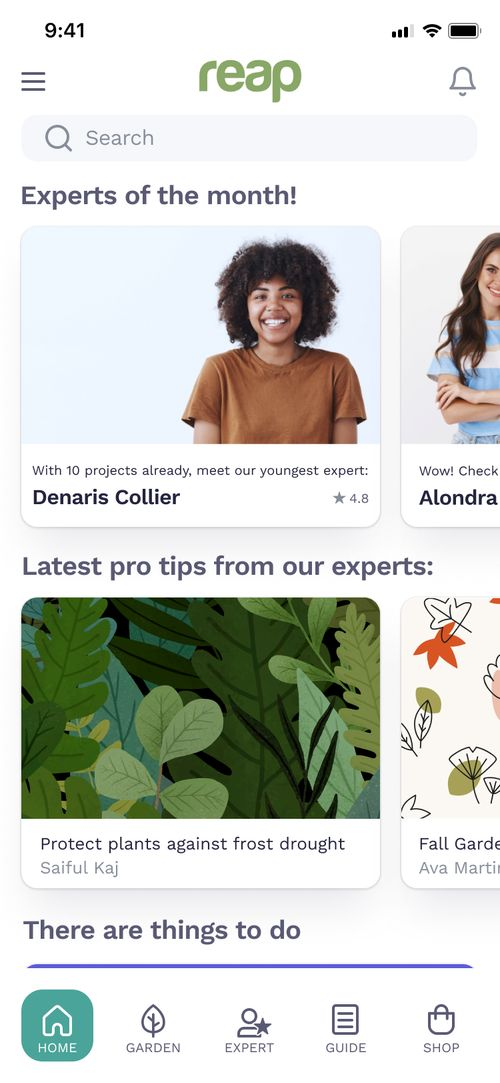
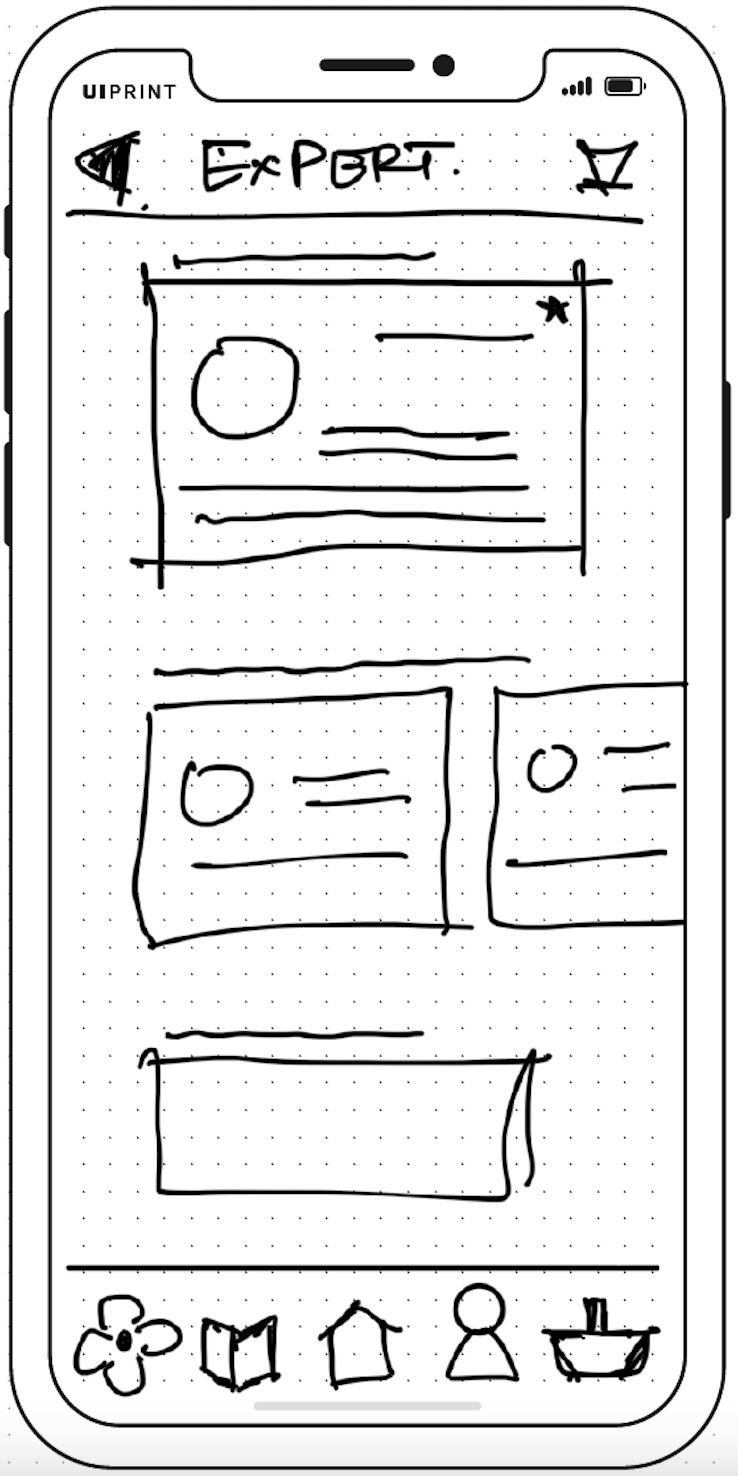
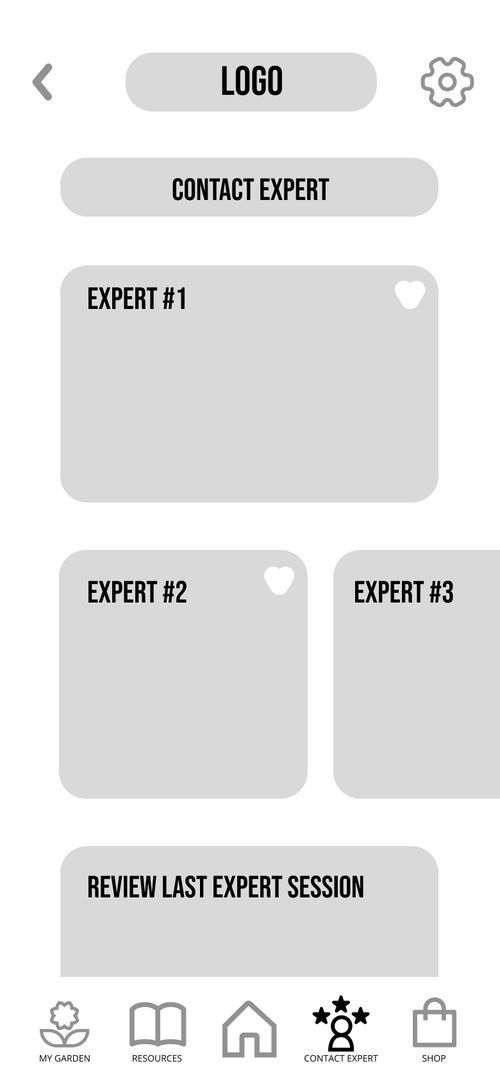
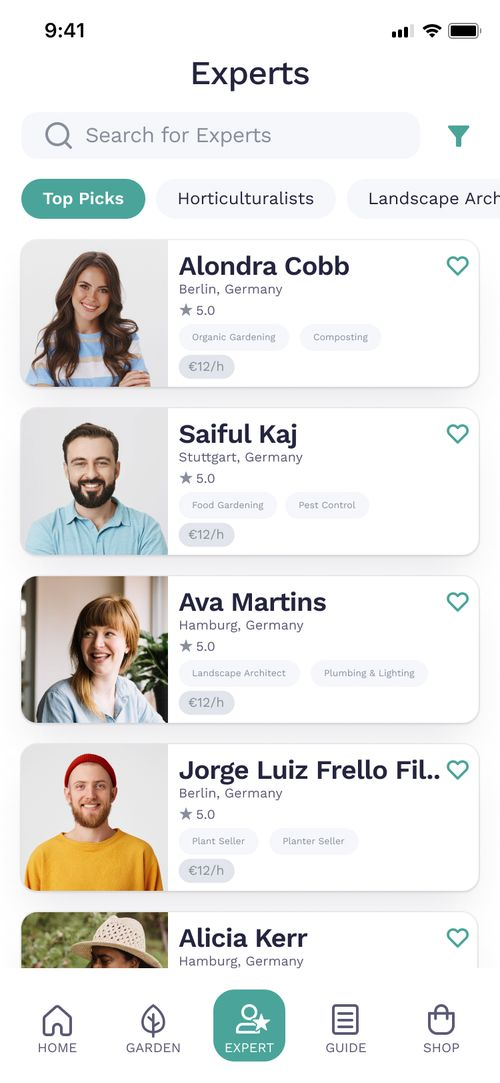
As the design evolved from a lo-fi to a hi-fi prototype, one could see the ideas forming better with each step. The evolution of the design from Lo-fi to Hi-fi for two key features is shown below:

HOME SCREEN

Low Fidelity
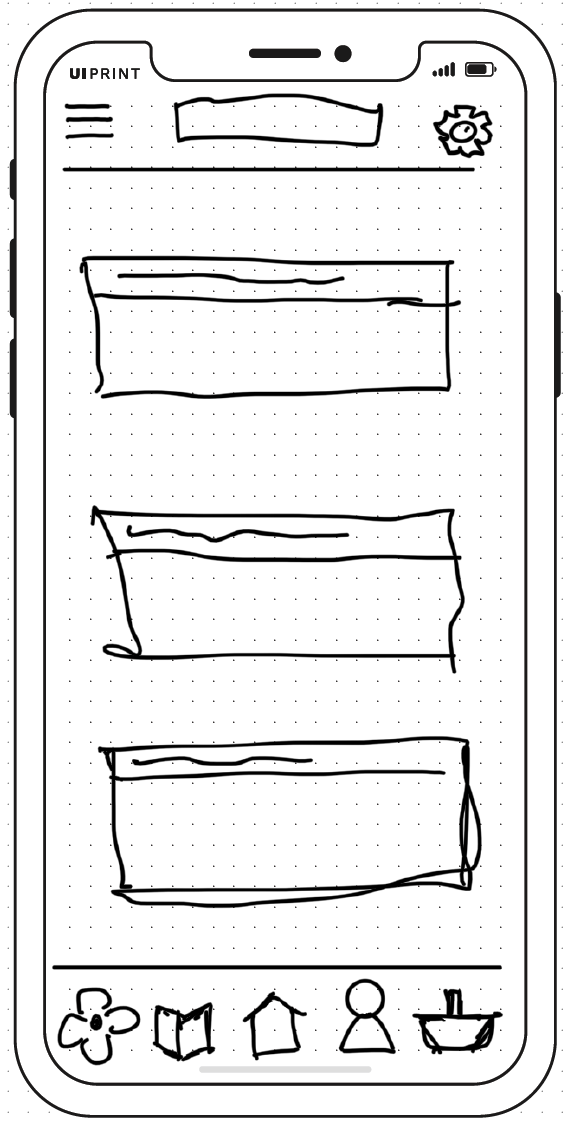
Mid Fidelity
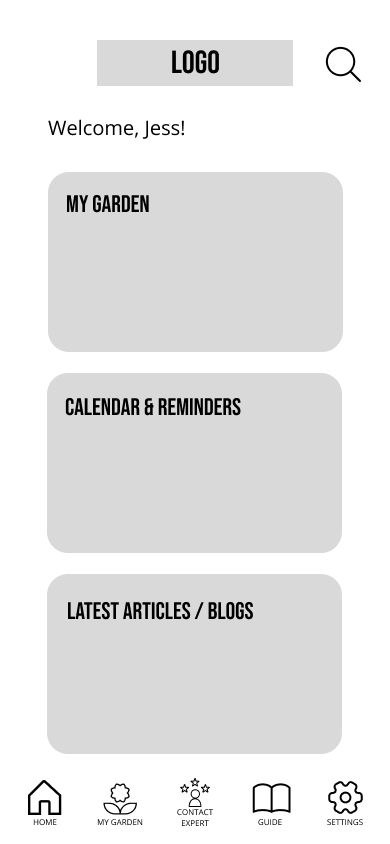
High Fidelity
EXPERTS LIST SCREEN

Low Fidelity
Mid Fidelity
High Fidelity
usability testing

Methodology: Moderated Remote | Moderated in-person TestingThe usability test was done with six participants. This was very helpful in identifying the weak points to understand what worked well and what could be improved. A glimpse of the improvements is illustrated below.


Usability Testing Full Report

Preference test

A preference test was conducted with 24 participants to validate the design decisions. Two images were tested for one of the onboarding screens. The purpose of testing the two images was to determine if users prefer a photograph of a plant or an illustration. The test helped define the rest of the onboarding screens as well as the overall theme of the application.
The most common words used to describe the preferred Option B were ‘warm,’ ‘friendly,’ and ‘inviting.’One of the participants stated that their reason for choosing the screen as, “I went for this one, based on the image showing the illustration of a person, and I think this goes nicely with your tagline, in that a goal is being worked on ‘together.’”

DeLIVER

Peer review

Design can never be done in isolation; feedback from colleagues helps only to improve the design further. After a successful peer review, the following revisions were incorporated:

Peer review based updates - Full report


Feedback about functional improvement and design consistency:

  1. The green button says ‘Yes,’ but the purpose is to cancel the reminder. Green has a positive connotation and might be better used to reinforce positive interactions with the app. Therefore, I changed the button text from ‘cancel’ to ‘remove.’
  2. Removing the back button from all the landing pages.
  3. Keeping only the first letter of the text as capital.
 

design handoff

After the extensive phase of designing & testing with constant iteration, it is time to prepare the project for a design handoff. A detailed Design language system was prepared to keep everyone in the same loop.

Design language system - Full report

Final Design

Responsive Web Application
Design your gardenwith Augmented Reality

Design with the real-time view, get more information about your plants and plan your next plant with the Good and Bad Combination. Check and set a reminder for each plant.

Interactive Prototype
Learnings of the UX journey

Hi! I'm Bhrigu, the person behind this app design.

One of the primary learning of this journey began with the choosing of the app topic. The inspiration was my brother, who had just moved to a new city and home with a beautiful backyard. He wanted to grow a vegetable garden but had little guidance to begin. Since he knows I am interested in plants, he asked for my opinion, but coming from a different country too, I didn’t know the regional plants or what they needed to thrive in this environment. I wanted to create something that is accessible to everyone, especially to those living in new places who wish to express their love for plants and nature.After the user interviews, I included the feature of meeting local gardening experts. Local indigenous gardening techniques result from years of experience and are reliable. I understood that someone from Latvia has a very different gardening experience than one from Australia. Therefore, a gardening expert can be a great help to guide you with the local techniques.Another aspect that I included was designing the garden with Augmented Reality. This was a challenging bit. There are no guidelines, as of now, for designing UX for AR-based applications. I went down a rabbit hole in my aspiration to design an AR Garden designing app. A few days into researching, I found myself downloading Adobe Aero, a beta version of Augmented Reality design software. I was ready to go to all lengths to perfect the UX of Reap. Soon I realized the core of UX designing, it is a process of improvements and never really perfect.On a personal note, I learned a few life lessons while working on this project. One of them is to be open to being wrong. I learned to let go of my ideas and my assumptions. Getting too attached to my ideas stifles innovation because it limited me from looking at other options and beyond. It changed my perspective from looking at ideas to defending my pride. Another significant learning was not to make assumptions. I was amazed at my assumptions and how many of them altered by simply questioning these assumptions to the potential users.